> ## Documentation Index
> Fetch the complete documentation index at: https://docs.blockops.network/llms.txt
> Use this file to discover all available pages before exploring further.
# Base
> Endpoints and example requests for Base Mainnet and Base Sepolia.
Base is a secure, low-cost, builder-friendly Ethereum L2 built to bring the next billion users onchain.
### How to Connect to Base
You can connect to Base using Blockops private API endpoints. Secure your data, speed up your queries, and take control of your API usage with our RPC API endpoint and personalized API keys. [Sign up now](https://app.blockops.network) to get your own API key.
### Base Mainnet
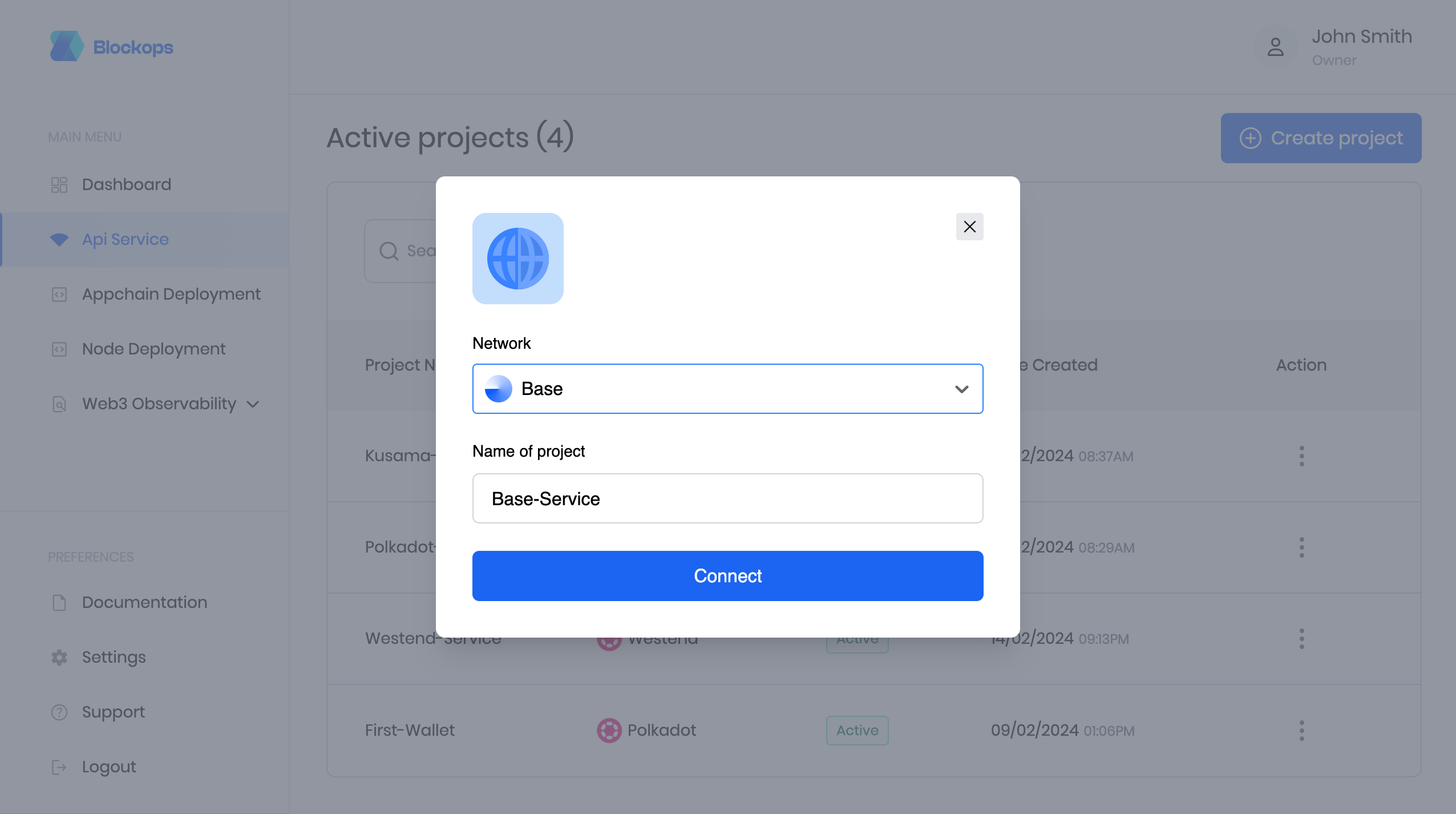
To get your API key, create a project using a unique Identifier as the project name and select Base from the network options.
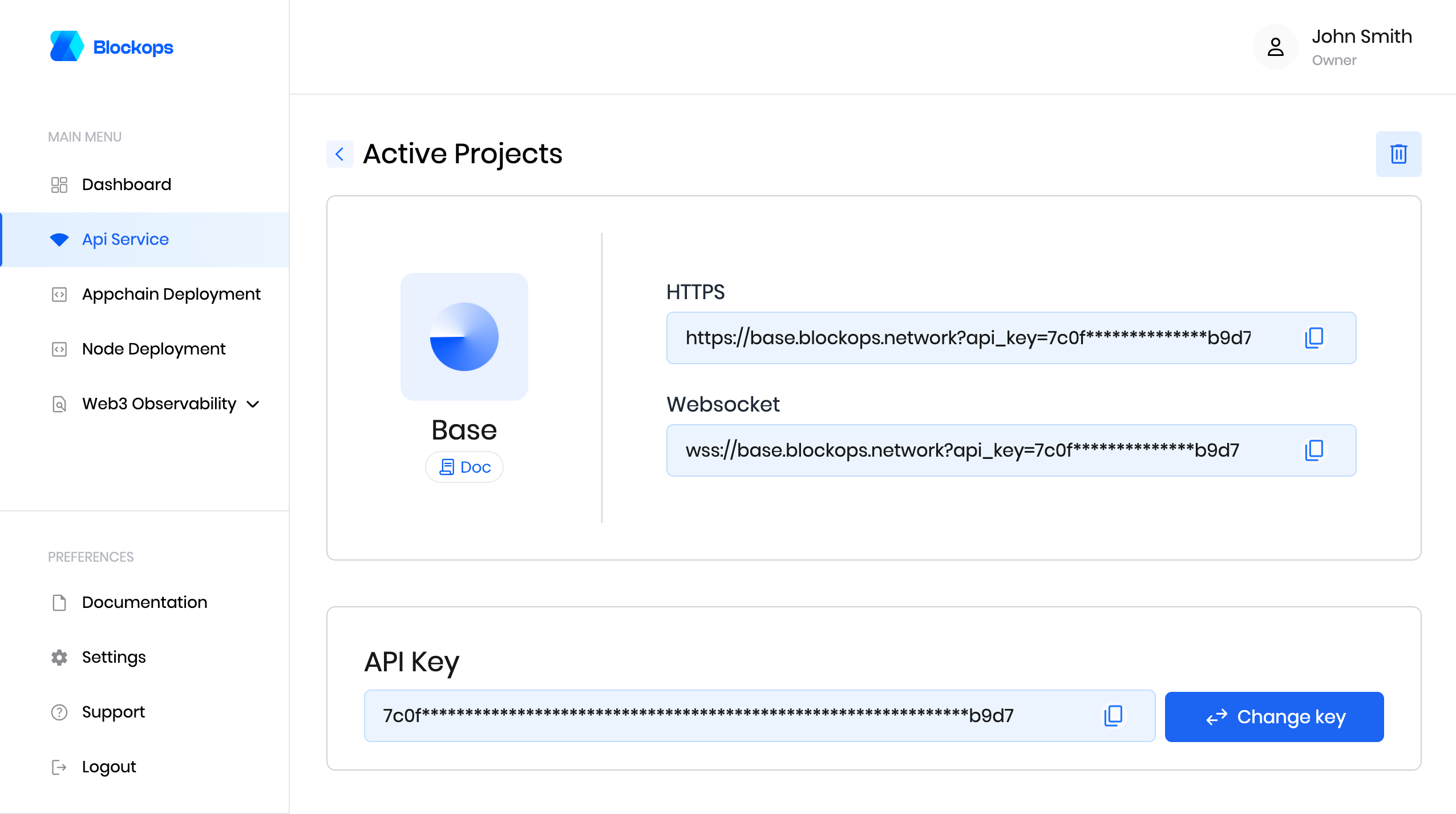
 Open the project to view your api key and rpc endpoints.
 ### Base Sepolia
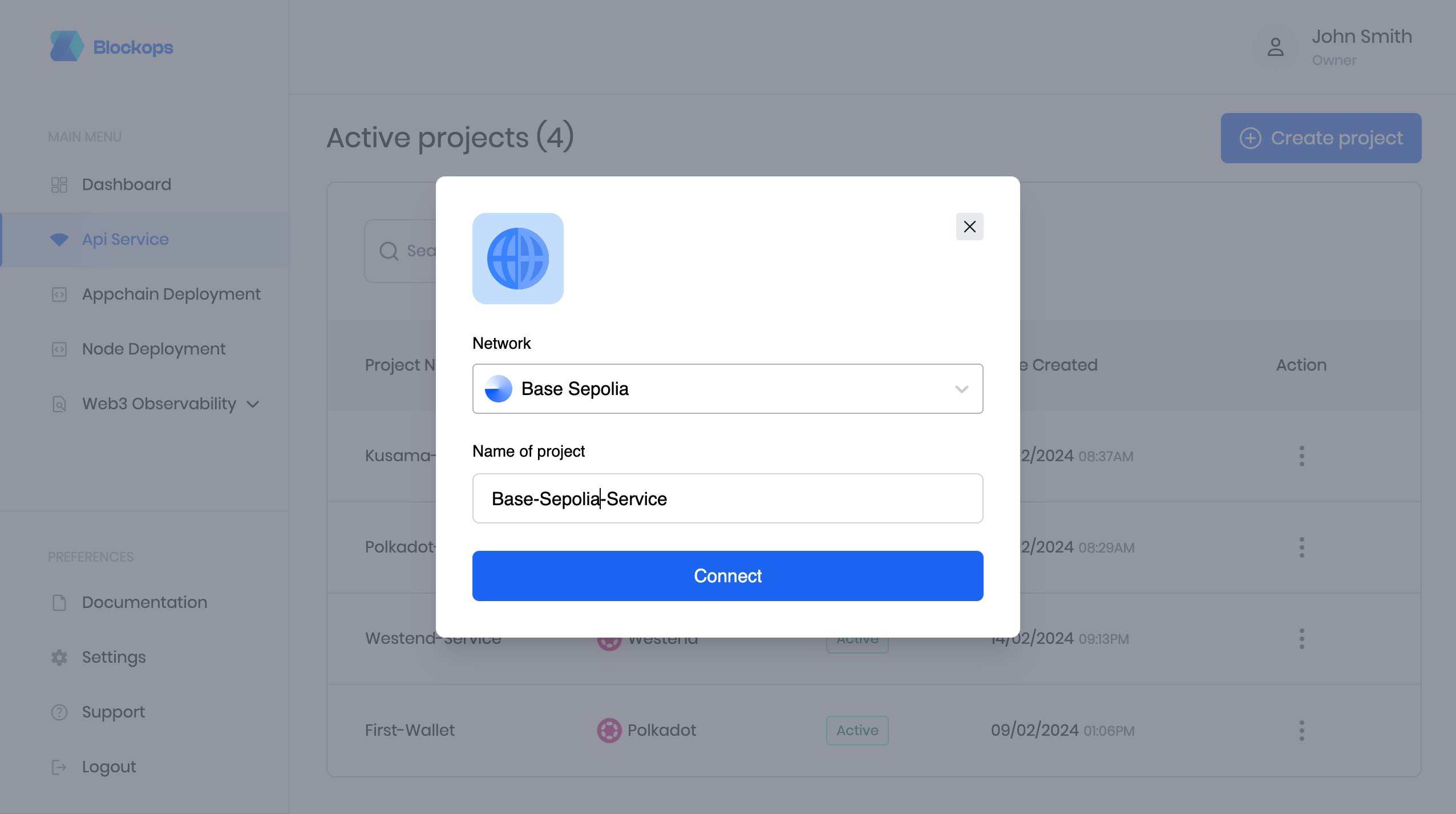
To get your API key, create a project using a unique Identifier as the project name and select Base Sepolia from the network options.
### Base Sepolia
To get your API key, create a project using a unique Identifier as the project name and select Base Sepolia from the network options.
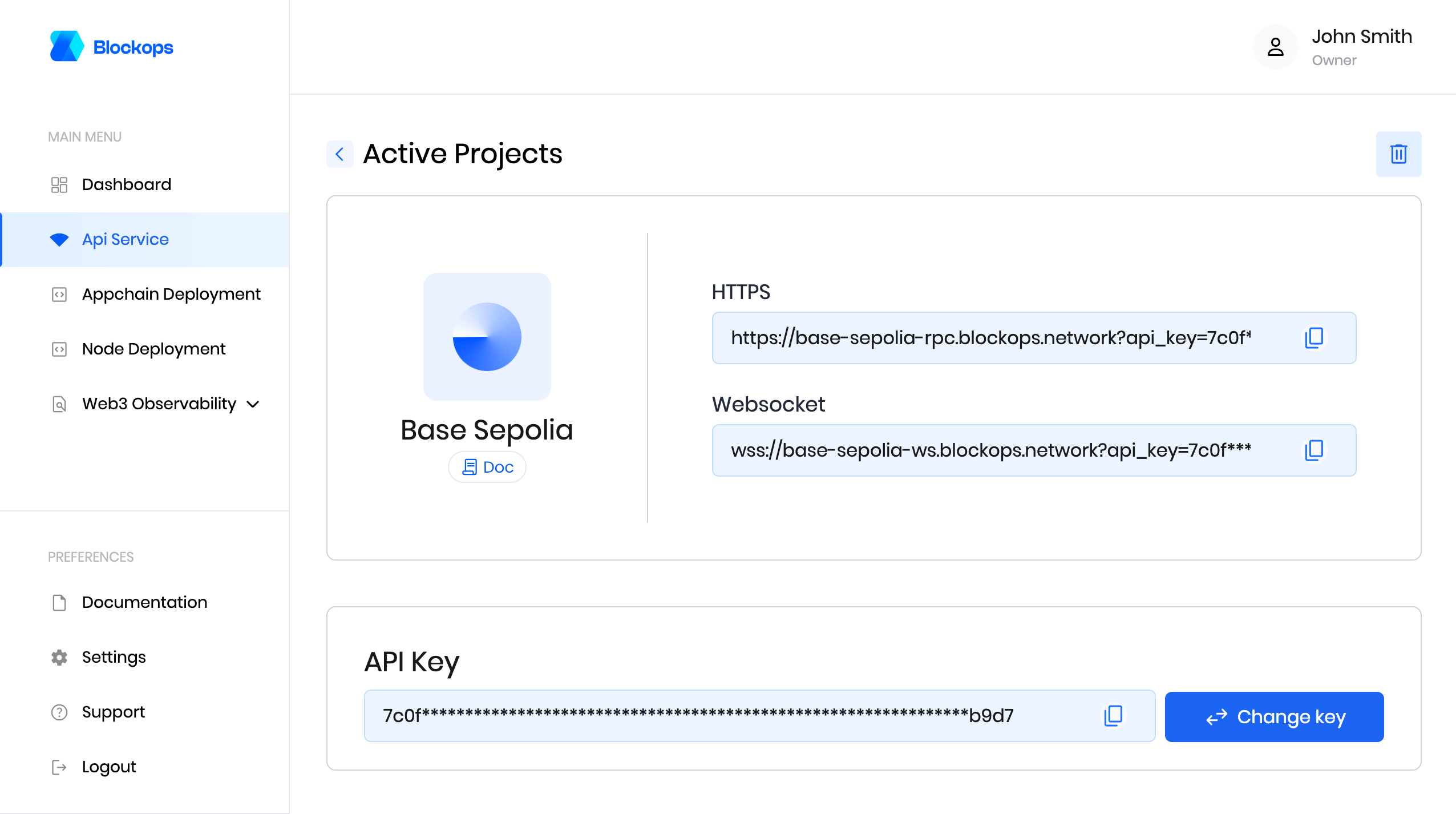
 Open the project to view your api key and rpc endpoints.
 #### Send requests
All requests are `POST` requests.
For Base Mainnet
```bash theme={null}
https://base.blockops.network/?api_key=************
```
For Base Sepolia
```bash theme={null}
https://base-sepolia-rpc.blockops.network?api_key=************
```
For Base Mainnet
```bash theme={null}
wss://base.blockops.network?api_key=************
```
For Base Sepolia
```bash theme={null}
wss://base-sepolia-ws.blockops.network?api_key=************
```
**Connect via Command Line**
You can connect to the network using websocket or HTTP with your API key in two ways:
* Adding the API key as a query string `?api_key=${APIKEY}`
* Or the request header `-H 'authorization: APIKEY ${APIKEY}'`
**Curl**
For example, the following CURL command can be used to get a block number.
### Base Mainnet
```bash theme={null}
curl -H "Content-Type: application/json" -H 'authorization: APIKEY xxxx' -d '{"jsonrpc":"2.0","method":"eth_blockNumber","params":[],"id":1}' https://base.blockops.network
```
### Base Sepolia
```bash theme={null}
curl -H "Content-Type: application/json" -H 'authorization: APIKEY xxxx' -d '{"jsonrpc":"2.0","method":"eth_blockNumber","params":[],"id":1}' https://base-sepolia-rpc.blockops.network
```
Here is the response you will receive back.
```bash theme={null}
{"jsonrpc":"2.0","id":1,"result":"0x10666b"}
```
**Wscat**
If you want to send data requests with WebSockets, you can use several libraries or wscat. You can install and use wscat as follows:
* Download wscat from [https://www.npmjs.com/package/wscat](https://www.npmjs.com/package/wscat)
* Install wscat by running the following command: `npm install -g wscat`
You can connect to the network with wscat using two options by adding the API key as a query string.
### Base Mainnet
```bash theme={null}
wscat -c 'wss://base.blockops.network?api_key=*********************'
```
Or the request header.
```bash theme={null}
wscat -c 'wss://base.blockops.network' --header 'authorization: APIKEY xxxx'
```
### Base Sepolia
```bash theme={null}
wscat -c 'wss://base-sepolia-rpc.blockops.network?api_key=*********************'
```
Or the request header.
```bash theme={null}
wscat -c 'wss://base-sepolia-ws.blockops.network' --header 'authorization: APIKEY xxxx'
```
After executing the command, the terminal will display a message indicating that the connection has been enabled successfully.
```bash theme={null}
Connected (press CTRL+C to quit)
>
```
Then, you can send the following request:
```
{"jsonrpc":"2.0","method":"eth_blockNumber","params":[],"id":1}
```
For more information on the Base network, please see the official [Base developer documentation](https://docs.base.org/).
Login or set up an account [here](https://app.blockops.network) to get started!
#### ***Quick Links***
[Website](https://www.base.org/)
[Github](https://github.com/base-org)
#### Send requests
All requests are `POST` requests.
For Base Mainnet
```bash theme={null}
https://base.blockops.network/?api_key=************
```
For Base Sepolia
```bash theme={null}
https://base-sepolia-rpc.blockops.network?api_key=************
```
For Base Mainnet
```bash theme={null}
wss://base.blockops.network?api_key=************
```
For Base Sepolia
```bash theme={null}
wss://base-sepolia-ws.blockops.network?api_key=************
```
**Connect via Command Line**
You can connect to the network using websocket or HTTP with your API key in two ways:
* Adding the API key as a query string `?api_key=${APIKEY}`
* Or the request header `-H 'authorization: APIKEY ${APIKEY}'`
**Curl**
For example, the following CURL command can be used to get a block number.
### Base Mainnet
```bash theme={null}
curl -H "Content-Type: application/json" -H 'authorization: APIKEY xxxx' -d '{"jsonrpc":"2.0","method":"eth_blockNumber","params":[],"id":1}' https://base.blockops.network
```
### Base Sepolia
```bash theme={null}
curl -H "Content-Type: application/json" -H 'authorization: APIKEY xxxx' -d '{"jsonrpc":"2.0","method":"eth_blockNumber","params":[],"id":1}' https://base-sepolia-rpc.blockops.network
```
Here is the response you will receive back.
```bash theme={null}
{"jsonrpc":"2.0","id":1,"result":"0x10666b"}
```
**Wscat**
If you want to send data requests with WebSockets, you can use several libraries or wscat. You can install and use wscat as follows:
* Download wscat from [https://www.npmjs.com/package/wscat](https://www.npmjs.com/package/wscat)
* Install wscat by running the following command: `npm install -g wscat`
You can connect to the network with wscat using two options by adding the API key as a query string.
### Base Mainnet
```bash theme={null}
wscat -c 'wss://base.blockops.network?api_key=*********************'
```
Or the request header.
```bash theme={null}
wscat -c 'wss://base.blockops.network' --header 'authorization: APIKEY xxxx'
```
### Base Sepolia
```bash theme={null}
wscat -c 'wss://base-sepolia-rpc.blockops.network?api_key=*********************'
```
Or the request header.
```bash theme={null}
wscat -c 'wss://base-sepolia-ws.blockops.network' --header 'authorization: APIKEY xxxx'
```
After executing the command, the terminal will display a message indicating that the connection has been enabled successfully.
```bash theme={null}
Connected (press CTRL+C to quit)
>
```
Then, you can send the following request:
```
{"jsonrpc":"2.0","method":"eth_blockNumber","params":[],"id":1}
```
For more information on the Base network, please see the official [Base developer documentation](https://docs.base.org/).
Login or set up an account [here](https://app.blockops.network) to get started!
#### ***Quick Links***
[Website](https://www.base.org/)
[Github](https://github.com/base-org)