> ## Documentation Index
> Fetch the complete documentation index at: https://docs.blockops.network/llms.txt
> Use this file to discover all available pages before exploring further.
# Common RPC methods & examples
> Common JSON-RPC methods, with cURL, wscat and @polkadot/api examples.
### Common EVM RPC Methods
Once your endpoints are generated, you can interact with the network using standard JSON-RPC methods. Here is a quick reference for the most common methods you will use when building your project:
| Category | Method | Description |
| :----------------------- | :-------------------------- | :----------------------------------------------------------------------------------------- |
| **Account Info** | `eth_getBalance` | Returns the native token balance of an address (e.g., LSK or ETH). |
| | `eth_getTransactionCount` | Returns the nonce of an account (essential for sending transactions). |
| **Chain State** | `eth_chainId` | Returns the specific Chain ID (e.g., Lisk Mainnet is 1135). |
| | `eth_gasPrice` | Returns the current price of gas on the network in wei. |
| **Transaction Info** | `eth_getTransactionByHash` | Gets the full details of a transaction using its unique hash. |
| | `eth_getTransactionReceipt` | Gets the receipt (status, logs, gas used) of a transaction. |
| **Contract Interaction** | `eth_call` | Executes a "read-only" call to a smart contract (costs zero gas). |
| | `eth_estimateGas` | Estimates how much gas a transaction will cost before you send it. |
| **Events & Logs** | `eth_getLogs` | Returns an array of all logs matching a specific filter (highly useful for indexing data). |
### Practical Examples
**Connect via a command line**
You can connect to the network using WebSocket or HTTP with your API key in two ways:
* Adding the API key as a query string `?api_key=${APIKEY}`
* Or the request header `-H 'authorization: APIKEY ${APIKEY}'`
**cURL**
For example, the following cURL command can be used to get the header and body of a block.
`curl -H "Content-Type: application/json" -H "authorization: APIKEY xxxx" -d '{"id":1, "jsonrpc":"2.0", "method": "eth_getBlockByNumber", "params": ["latest", true]}' https://lisk.rpc.blockops.network/rpc`
**What Success Looks Like:**
Here is the successful JSON response you will receive back, proving your app is communicating with the chain:
`{"jsonrpc":"2.0","result":{"hash":"0x381dd358f0b1e328e861822b2a51a72e8dc064803a5c7ccc96277da3b16d7667","number":"0xe07a1d", "timestamp": "0x65123abc"},"id":1}`
**wscat**
If you want to send data requests with WebSockets, you can use several libraries or wscat. You can install and use wscat as follows:
* Download wscat from [https://www.npmjs.com/package/wscat](https://www.npmjs.com/package/wscat)
* Install wscat by running the following command: `npm install -g wscat`
You can connect to the network with wscat using two options. With the request header:
`wscat -c 'wss://lisk.rpc.blockops.network/ws' --header 'authorization: APIKEY xxxx'`
Or by adding the API key as a query string:
`wscat -c 'wss://lisk.rpc.blockops.network/ws?api_key=**********************'`
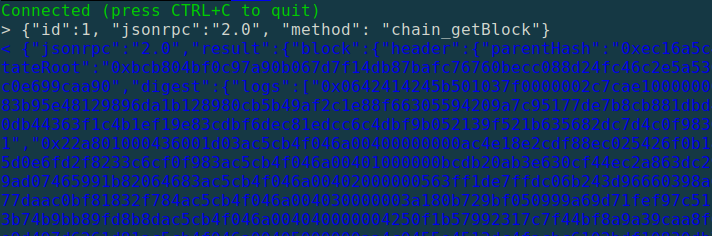
After executing the command, the terminal will display a message indicating that the connection has been enabled successfully:
`Connected (press CTRL+C to quit)`
Then, you can send the following request into the open terminal:
`> {"id":1, "jsonrpc":"2.0", "method": "eth_blockNumber"}`
 ### Connect via Polkadot JS API
If you are building on Polkadot or any Substrate-based chain, you can connect your application using the official `@polkadot/api` library.
First, install the library in your project repository:
```bash theme={null}
npm install @polkadot/api
```
Then, instantiate the `WsProvider` using your Blockops WSS endpoint. The most reliable way to authenticate is by appending your API key as a query parameter in the URL.
```javascript theme={null}
import { ApiPromise, WsProvider } from "@polkadot/api";
async function connectToBlockops() {
const WSS_URL = "wss://polkadot.rpc.blockops.network/ws?api_key=YOUR_API_KEY";
const wsProvider = new WsProvider(WSS_URL);
try {
const api = await ApiPromise.create({ provider: wsProvider });
const chain = await api.rpc.system.chain();
const lastHeader = await api.rpc.chain.getHeader();
console.log(`Successfully connected to ${chain}!`);
console.log(`Latest Block Number: ${lastHeader.number.toHuman()}`);
} catch (error) {
console.error("Connection failed:", error);
}
}
connectToBlockops();
```
### Connect via Polkadot JS API
If you are building on Polkadot or any Substrate-based chain, you can connect your application using the official `@polkadot/api` library.
First, install the library in your project repository:
```bash theme={null}
npm install @polkadot/api
```
Then, instantiate the `WsProvider` using your Blockops WSS endpoint. The most reliable way to authenticate is by appending your API key as a query parameter in the URL.
```javascript theme={null}
import { ApiPromise, WsProvider } from "@polkadot/api";
async function connectToBlockops() {
const WSS_URL = "wss://polkadot.rpc.blockops.network/ws?api_key=YOUR_API_KEY";
const wsProvider = new WsProvider(WSS_URL);
try {
const api = await ApiPromise.create({ provider: wsProvider });
const chain = await api.rpc.system.chain();
const lastHeader = await api.rpc.chain.getHeader();
console.log(`Successfully connected to ${chain}!`);
console.log(`Latest Block Number: ${lastHeader.number.toHuman()}`);
} catch (error) {
console.error("Connection failed:", error);
}
}
connectToBlockops();
```