

Common EVM RPC Methods
Once your endpoints are generated, you can interact with the network using standard JSON-RPC methods. Here is a quick reference for the most common methods you will use when building your project:Practical Examples
Connect via a command line You can connect to the network using WebSocket or HTTP with your API key in two ways:- Adding the API key as a query string
?api_key=${APIKEY} - Or the request header
-H 'authorization: APIKEY ${APIKEY}'
curl -H "Content-Type: application/json" -H "authorization: APIKEY xxxx" -d '{"id":1, "jsonrpc":"2.0", "method": "eth_getBlockByNumber", "params": ["latest", true]}' https://lisk.rpc.blockops.network/rpc
What Success Looks Like:
Here is the successful JSON response you will receive back, proving your app is communicating with the chain:
{"jsonrpc":"2.0","result":{"hash":"0x381dd358f0b1e328e861822b2a51a72e8dc064803a5c7ccc96277da3b16d7667","number":"0xe07a1d", "timestamp": "0x65123abc"},"id":1}
wscat
If you want to send data requests with WebSockets, you can use several libraries or wscat. You can install and use wscat as follows:
- Download wscat from https://www.npmjs.com/package/wscat
- Install wscat by running the following command:
npm install -g wscat
wscat -c 'wss://lisk.rpc.blockops.network/ws' --header 'authorization: APIKEY xxxx'
Or by adding the API key as a query string:
wscat -c 'wss://lisk.rpc.blockops.network/ws?api_key=**********************'
After executing the command, the terminal will display a message indicating that the connection has been enabled successfully:
Connected (press CTRL+C to quit)
Then, you can send the following request into the open terminal:
> {"id":1, "jsonrpc":"2.0", "method": "eth_blockNumber"}
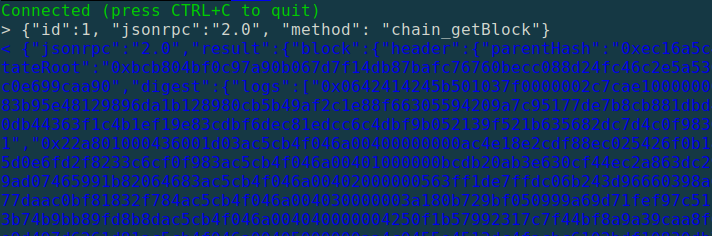
Response from network node
Connect via Polkadot JS API
If you are building on Polkadot or any Substrate-based chain, you can connect your application using the official@polkadot/api library.
First, install the library in your project repository:
WsProvider using your Blockops WSS endpoint. The most reliable way to authenticate is by appending your API key as a query parameter in the URL.